Tutorial with Synthetic Data
This is an example notebook with overview of the usage of the modules in tscluster.
!pip install -r https://raw.githubusercontent.com/tscluster-project/tscluster/main/requirements.txt
!pip install tscluster # install tscluster
Requirement already satisfied: numpy>=1.26 in /usr/local/lib/python3.10/dist-packages (from -r https://raw.githubusercontent.com/tscluster-project/tscluster/main/requirements.txt (line 1)) (1.26.4)
Requirement already satisfied: pandas>=2.2 in /usr/local/lib/python3.10/dist-packages (from -r https://raw.githubusercontent.com/tscluster-project/tscluster/main/requirements.txt (line 2)) (2.2.2)
Requirement already satisfied: matplotlib<3.9,>=3.8 in /usr/local/lib/python3.10/dist-packages (from -r https://raw.githubusercontent.com/tscluster-project/tscluster/main/requirements.txt (line 3)) (3.8.4)
Requirement already satisfied: python-dateutil>=2.8.2 in /usr/local/lib/python3.10/dist-packages (from pandas>=2.2->-r https://raw.githubusercontent.com/tscluster-project/tscluster/main/requirements.txt (line 2)) (2.8.2)
Requirement already satisfied: pytz>=2020.1 in /usr/local/lib/python3.10/dist-packages (from pandas>=2.2->-r https://raw.githubusercontent.com/tscluster-project/tscluster/main/requirements.txt (line 2)) (2023.4)
Requirement already satisfied: tzdata>=2022.7 in /usr/local/lib/python3.10/dist-packages (from pandas>=2.2->-r https://raw.githubusercontent.com/tscluster-project/tscluster/main/requirements.txt (line 2)) (2024.1)
Requirement already satisfied: contourpy>=1.0.1 in /usr/local/lib/python3.10/dist-packages (from matplotlib<3.9,>=3.8->-r https://raw.githubusercontent.com/tscluster-project/tscluster/main/requirements.txt (line 3)) (1.2.1)
Requirement already satisfied: cycler>=0.10 in /usr/local/lib/python3.10/dist-packages (from matplotlib<3.9,>=3.8->-r https://raw.githubusercontent.com/tscluster-project/tscluster/main/requirements.txt (line 3)) (0.12.1)
Requirement already satisfied: fonttools>=4.22.0 in /usr/local/lib/python3.10/dist-packages (from matplotlib<3.9,>=3.8->-r https://raw.githubusercontent.com/tscluster-project/tscluster/main/requirements.txt (line 3)) (4.51.0)
Requirement already satisfied: kiwisolver>=1.3.1 in /usr/local/lib/python3.10/dist-packages (from matplotlib<3.9,>=3.8->-r https://raw.githubusercontent.com/tscluster-project/tscluster/main/requirements.txt (line 3)) (1.4.5)
Requirement already satisfied: packaging>=20.0 in /usr/local/lib/python3.10/dist-packages (from matplotlib<3.9,>=3.8->-r https://raw.githubusercontent.com/tscluster-project/tscluster/main/requirements.txt (line 3)) (24.0)
Requirement already satisfied: pillow>=8 in /usr/local/lib/python3.10/dist-packages (from matplotlib<3.9,>=3.8->-r https://raw.githubusercontent.com/tscluster-project/tscluster/main/requirements.txt (line 3)) (9.4.0)
Requirement already satisfied: pyparsing>=2.3.1 in /usr/local/lib/python3.10/dist-packages (from matplotlib<3.9,>=3.8->-r https://raw.githubusercontent.com/tscluster-project/tscluster/main/requirements.txt (line 3)) (3.1.2)
Requirement already satisfied: six>=1.5 in /usr/local/lib/python3.10/dist-packages (from python-dateutil>=2.8.2->pandas>=2.2->-r https://raw.githubusercontent.com/tscluster-project/tscluster/main/requirements.txt (line 2)) (1.16.0)
Requirement already satisfied: tscluster in /usr/local/lib/python3.10/dist-packages (1.0.4)
Requirement already satisfied: numpy>=1.26 in /usr/local/lib/python3.10/dist-packages (from tscluster) (1.26.4)
Requirement already satisfied: scipy>=1.10 in /usr/local/lib/python3.10/dist-packages (from tscluster) (1.11.4)
Requirement already satisfied: gurobipy>=11.0 in /usr/local/lib/python3.10/dist-packages (from tscluster) (11.0.2)
Requirement already satisfied: tslearn>=0.6.3 in /usr/local/lib/python3.10/dist-packages (from tscluster) (0.6.3)
Requirement already satisfied: h5py>=3.10 in /usr/local/lib/python3.10/dist-packages (from tscluster) (3.11.0)
Requirement already satisfied: pandas>=2.2 in /usr/local/lib/python3.10/dist-packages (from tscluster) (2.2.2)
Requirement already satisfied: matplotlib<3.9,>=3.8 in /usr/local/lib/python3.10/dist-packages (from tscluster) (3.8.4)
Requirement already satisfied: contourpy>=1.0.1 in /usr/local/lib/python3.10/dist-packages (from matplotlib<3.9,>=3.8->tscluster) (1.2.1)
Requirement already satisfied: cycler>=0.10 in /usr/local/lib/python3.10/dist-packages (from matplotlib<3.9,>=3.8->tscluster) (0.12.1)
Requirement already satisfied: fonttools>=4.22.0 in /usr/local/lib/python3.10/dist-packages (from matplotlib<3.9,>=3.8->tscluster) (4.51.0)
Requirement already satisfied: kiwisolver>=1.3.1 in /usr/local/lib/python3.10/dist-packages (from matplotlib<3.9,>=3.8->tscluster) (1.4.5)
Requirement already satisfied: packaging>=20.0 in /usr/local/lib/python3.10/dist-packages (from matplotlib<3.9,>=3.8->tscluster) (24.0)
Requirement already satisfied: pillow>=8 in /usr/local/lib/python3.10/dist-packages (from matplotlib<3.9,>=3.8->tscluster) (9.4.0)
Requirement already satisfied: pyparsing>=2.3.1 in /usr/local/lib/python3.10/dist-packages (from matplotlib<3.9,>=3.8->tscluster) (3.1.2)
Requirement already satisfied: python-dateutil>=2.7 in /usr/local/lib/python3.10/dist-packages (from matplotlib<3.9,>=3.8->tscluster) (2.8.2)
Requirement already satisfied: pytz>=2020.1 in /usr/local/lib/python3.10/dist-packages (from pandas>=2.2->tscluster) (2023.4)
Requirement already satisfied: tzdata>=2022.7 in /usr/local/lib/python3.10/dist-packages (from pandas>=2.2->tscluster) (2024.1)
Requirement already satisfied: scikit-learn in /usr/local/lib/python3.10/dist-packages (from tslearn>=0.6.3->tscluster) (1.2.2)
Requirement already satisfied: numba in /usr/local/lib/python3.10/dist-packages (from tslearn>=0.6.3->tscluster) (0.58.1)
Requirement already satisfied: joblib in /usr/local/lib/python3.10/dist-packages (from tslearn>=0.6.3->tscluster) (1.4.2)
Requirement already satisfied: six>=1.5 in /usr/local/lib/python3.10/dist-packages (from python-dateutil>=2.7->matplotlib<3.9,>=3.8->tscluster) (1.16.0)
Requirement already satisfied: llvmlite<0.42,>=0.41.0dev0 in /usr/local/lib/python3.10/dist-packages (from numba->tslearn>=0.6.3->tscluster) (0.41.1)
Requirement already satisfied: threadpoolctl>=2.0.0 in /usr/local/lib/python3.10/dist-packages (from scikit-learn->tslearn>=0.6.3->tscluster) (3.5.0)
Importing Libraries
# uncomment the line below if widget is enable in your environment. This is useful for making tsplot's waterfall_plot interactive
# %matplotlib widget

import os

import numpy as np
import pandas as pd
import requests

from tscluster.opttscluster import OptTSCluster
from tscluster.tskmeans import TSKmeans, TSGlobalKmeans
from tscluster.preprocessing import TSStandardScaler, TSMinMaxScaler
from tscluster.preprocessing.utils import load_data, tnf_to_ntf, ntf_to_tnf, to_dfs, broadcast_data
from tscluster.metrics import inertia, max_dist
from tscluster.tsplot import tsplot
par_dir = "tscluster_sample_data"
# download the sample data

# we need to store the data on the local Colab file system
!wget https://raw.githubusercontent.com/tscluster-project/tscluster/main/test/tscluster_sample_data.zip

if not os.path.exists(par_dir):
        os.makedirs(par_dir)

# unzipping the downloaded file to 'tscluster_sample_data' directory in local file system
!unzip -o tscluster_sample_data.zip -d tscluster_sample_data
--2024-05-22 00:02:47--  https://raw.githubusercontent.com/tscluster-project/tscluster/main/test/tscluster_sample_data.zip
Resolving raw.githubusercontent.com (raw.githubusercontent.com)... 185.199.108.133, 185.199.109.133, 185.199.110.133, ...
Connecting to raw.githubusercontent.com (raw.githubusercontent.com)|185.199.108.133|:443... connected.
HTTP request sent, awaiting response... 200 OK
Length: 11197 (11K) [application/zip]
Saving to: ‘tscluster_sample_data.zip.2’


      tscluster   0%[                    ]       0  --.-KB/s
tscluster_sample_da 100%[===================>] 10.93K –.-KB/s in 0s
2024-05-22 00:02:47 (34.9 MB/s) - ‘tscluster_sample_data.zip.2’ saved [11197/11197]
- Archive: tscluster_sample_data.zip
inflating: tscluster_sample_data/synthetic_csv/timestep_0.csv inflating: tscluster_sample_data/synthetic_csv/timestep_1.csv inflating: tscluster_sample_data/synthetic_csv/timestep_2.csv inflating: tscluster_sample_data/synthetic_csv/timestep_3.csv inflating: tscluster_sample_data/synthetic_csv/timestep_4.csv inflating: tscluster_sample_data/synthetic_csv2/year-2000.csv inflating: tscluster_sample_data/synthetic_csv2/year-2005.csv inflating: tscluster_sample_data/synthetic_csv2/year-2010.csv inflating: tscluster_sample_data/synthetic_csv2/year-2015.csv inflating: tscluster_sample_data/synthetic_csv2/year-2020.csv inflating: tscluster_sample_data/synthetic_json/timestep_0.json inflating: tscluster_sample_data/synthetic_json/timestep_1.json inflating: tscluster_sample_data/synthetic_json/timestep_2.json inflating: tscluster_sample_data/synthetic_json/timestep_3.json inflating: tscluster_sample_data/synthetic_json/timestep_4.json inflating: tscluster_sample_data/synthetic_npy/timestep_0.npy inflating: tscluster_sample_data/synthetic_npy/timestep_1.npy inflating: tscluster_sample_data/synthetic_npy/timestep_2.npy inflating: tscluster_sample_data/synthetic_npy/timestep_3.npy inflating: tscluster_sample_data/synthetic_npy/timestep_4.npy inflating: tscluster_sample_data/sythetic_data.npy
os.chdir(par_dir)
Loading Data
from a npy file
If data is a numpy array stored as a .npy file, you can use the
load_data function to load it.
X, label_dict = load_data("./sythetic_data.npy")
X.shape
(10, 15, 1)
The load_data function returns a tuple, the first value of the tuple
is the loaded data (a 3-D array in ‘TNF’ format), while the second value
of the tuple is the label_dict of the data. The label_dict is a
dictionary whose keys are ‘T’, ‘N’, and ‘F’ (which are the number of
time steps, entities, and features respectively). Value of each key is a
list such that the value of key: - ‘T’ is a list of names/labels of each
time step to be used as index of each dataframe. If None, range(0, T) is
used. Where T is the number of time steps in the fitted data - ‘N’
(ignored) is a list of names/labels of each entity. If None, range(0, N)
is used. Where N is the number of entities/observations in the fitted
data - ‘F’ is a list of names/labels of each feature to be used as
column of each dataframe. If None, range(0, F) is used. Where F is the
number of features in the fitted data
# checking the label_dict
print(label_dict)
{'T': [0, 1, 2, 3, 4, 5, 6, 7, 8, 9], 'N': [0, 1, 2, 3, 4, 5, 6, 7, 8, 9, 10, 11, 12, 13, 14], 'F': [0]}
As seen in the output above, the data has 10 time steps, 15 entities and 1 feature. The data is a synthetic data created for demonstration purposes in this notebook. The time steps could be years e.g. year 2001 to 2010, the entities could be zipcodes/postal codes e.g 15 postal codes in Toronto, and the features could be any variable(s) measured for each entity in each time step e.g. population.
This notebook will focus on using the common attributes and methods of the modules available in tscluster. For an example notebook with applications to real-life data, see this notebook.
Checking the first time steps of the first five entities.
X[:5, :5, :]
array([[[15.09011416],
        [15.09011416],
        [ 6.92001802],
        [ 6.92001802],
        [11.39918324]],

       [[10.4044138 ],
        [10.4044138 ],
        [ 8.76582237],
        [ 8.76582237],
        [11.33740921]],

       [[ 8.67698496],
        [ 8.67698496],
        [ 9.55393712],
        [ 9.55393712],
        [10.57717395]],

       [[ 6.01642654],
        [ 6.01642654],
        [10.63908781],
        [10.63908781],
        [10.6098427 ]],

       [[ 4.89052455],
        [ 4.89052455],
        [11.61399362],
        [11.61399362],
        [ 9.34167455]]])
from a list
Data can also be loaded from a list. This can be a list of 2-D numpy
arrays, or list of pandas dataframes, or list of file paths. By default,
the list is of length T (number of time steps), where each element
of the list is interpreted as a data for all entities at a particular
time step. Set the arr_format parameter to ‘NTF’ to specify that
each element of the input list is the time series data for a particular
entity for all time steps. Valid files are .npy, .npz,
.json, xlsx, .csv or any file readable by
pandas.read_csv function.
Reading from a list of dataframes
df1 = pd.DataFrame({
    'f1': np.arange(5),
    'f2': np.arange(5, 10)
}, index=['e'+str(i+1) for i in range(5)]
                  )
df1
| f1 | f2 | |
|---|---|---|
| e1 | 0 | 5 |
| e2 | 1 | 6 |
| e3 | 2 | 7 |
| e4 | 3 | 8 |
| e5 | 4 | 9 |
df2 = pd.DataFrame({
    'f2': np.arange(105, 110),
    'f1': np.arange(100, 105)
}, index=['e'+str(i+1) for i in range(5)]
                  )
df2
| f2 | f1 | |
|---|---|---|
| e1 | 105 | 100 |
| e2 | 106 | 101 |
| e3 | 107 | 102 |
| e4 | 108 | 103 |
| e5 | 109 | 104 |
X_arr, label_dict = load_data([df1, df2])
print(f"shape of X_arr is {X_arr.shape}")
X_arr = X_arr.astype(np.float64)
X_arr
shape of X_arr is (2, 5, 2)
array([[[  0.,   5.],
        [  1.,   6.],
        [  2.,   7.],
        [  3.,   8.],
        [  4.,   9.]],

       [[100., 105.],
        [101., 106.],
        [102., 107.],
        [103., 108.],
        [104., 109.]]])
label_dict
{'T': [0, 1], 'N': ['e1', 'e2', 'e3', 'e4', 'e5'], 'F': ['f1', 'f2']}
To get the output in ‘NTF’ format, set the output_arr_format
parameter to ‘NTF’
X_arr, label_dict = load_data([df1, df2], output_arr_format='NTF')
print(f"shape of X_arr is {X_arr.shape}")
X_arr
shape of X_arr is (5, 2, 2)
array([[[  0.,   5.],
        [100., 105.]],

       [[  1.,   6.],
        [101., 106.]],

       [[  2.,   7.],
        [102., 107.]],

       [[  3.,   8.],
        [103., 108.]],

       [[  4.,   9.],
        [104., 109.]]])
label_dict # label_dict will remain the same
{'T': [0, 1], 'N': ['e1', 'e2', 'e3', 'e4', 'e5'], 'F': ['f1', 'f2']}
The same applies to list of file paths. E.g.
file_list = [
    "./synthetic_csv/timestep_0.csv",
    "./synthetic_csv/timestep_1.csv",
    "./synthetic_csv/timestep_2.csv",
    "./synthetic_csv/timestep_3.csv",
    "./synthetic_csv/timestep_4.csv"
]

X_arr, label_dict = load_data(file_list)
print(f"shape of X_arr is {X_arr.shape}")
shape of X_arr is (5, 20, 2)
label_dict
{'T': [0, 1, 2, 3, 4],
 'N': [0, 1, 2, 3, 4, 5, 6, 7, 8, 9, 10, 11, 12, 13, 14, 15, 16, 17, 18, 19],
 'F': [0, 1]}
You can also pass arguments to the file reader used by using the
read_file_args parameter. This parameter accepts a dictionary where
the keys are the names of the file reader parameters (in string), and
the values are the values of the file reader parameter. E.g. if file
reader is pd.read_csv (reader for csv file), you can pass names and
skiprows arguments (and basically any argument you want to pass to
the file reader).
file_list = [
    "./synthetic_csv/timestep_0.csv",
    "./synthetic_csv/timestep_1.csv",
    "./synthetic_csv/timestep_2.csv",
    "./synthetic_csv/timestep_3.csv",
    "./synthetic_csv/timestep_4.csv"
]

X_arr, label_dict = load_data(file_list, read_file_args={'names': ['x1', 'x2'], 'skiprows': 10})
print(f"shape of X_arr is {X_arr.shape}")
shape of X_arr is (5, 10, 2)
label_dict
{'T': [0, 1, 2, 3, 4], 'N': [0, 1, 2, 3, 4, 5, 6, 7, 8, 9], 'F': ['x1', 'x2']}
from a directory
You can instead pass a directory path (as a string) to the load_data
function. In this case, the suffix (not file extension) of the filenames
will be used for ordering the files before loading them as different
timesteps. The suffix consists of characters after suffix_sep (not
including file extension). The default value for suffix_sep is an
undescore “_“. E.g. if the ‘synthetic_csv’ directory contains the
following files:
timestep_1.csv
timestep_2.csv
timestep_3.csv
timestep_4.csv
We can read the files as follows:
X_arr, label_dict = load_data('./synthetic_csv')
print(f"shape of X_arr is {X_arr.shape}")
shape of X_arr is (5, 20, 2)
label_dict
{'T': [0, 1, 2, 3, 4],
 'N': [0, 1, 2, 3, 4, 5, 6, 7, 8, 9, 10, 11, 12, 13, 14, 15, 16, 17, 18, 19],
 'F': [0, 1]}
The suffixes of the filenames may not neccessarily start from 1 or have an interval of 1. For example, the filenames could be:
year-2000.csv
year-2005.csv
year-2010.csv
year-2015.csv
year-2020.csv
So long the suffixes can be sorted and there is a consistent suffix
separator (“-” is this case), the directory can be parsed by
load_data function.
# checking how the head of a single
pd.read_csv('./synthetic_csv2/year-2005.csv').head()
| Unnamed: 0 | x1 | x2 | x3 | |
|---|---|---|---|---|
| 0 | i1 | 1.144403 | 1.384766 | -0.296697 |
| 1 | i2 | -0.221455 | -2.379010 | 1.616871 |
| 2 | i3 | 1.533177 | -1.650524 | -0.548531 |
| 3 | i4 | -0.615204 | 0.794567 | -0.726242 |
| 4 | i5 | 0.622818 | -0.129735 | -0.723215 |
# if we were to indicate to pandas that the first column is the index and the first row is the header, we would have done
pd.read_csv('./synthetic_csv2/year-2005.csv', index_col=[0], header=0).head()
| x1 | x2 | x3 | |
|---|---|---|---|
| i1 | 1.144403 | 1.384766 | -0.296697 |
| i2 | -0.221455 | -2.379010 | 1.616871 |
| i3 | 1.533177 | -1.650524 | -0.548531 |
| i4 | -0.615204 | 0.794567 | -0.726242 |
| i5 | 0.622818 | -0.129735 | -0.723215 |
# using load_data function
X_arr, label_dict = load_data('./synthetic_csv2',
                              suffix_sep='-',
                              use_suffix_as_label=True,
                              read_file_args={'index_col': [0], 'header': 0})
print(f"shape of X_arr is {X_arr.shape}")
shape of X_arr is (5, 10, 3)
print(label_dict)
{'T': ['2000', '2005', '2010', '2015', '2020'], 'N': ['i1', 'i10', 'i2', 'i3', 'i4', 'i5', 'i6', 'i7', 'i8', 'i9'], 'F': ['x1', 'x2', 'x3']}
Data Conversion
to_dfs
We can convert a 3-D array to a list of dataframes using the to_dfs
function. This is basically the reverse process of load_dict in that
it takes a 3-D array and an optional label_dict, and returns a list of
dataframes. Similar to load_dict function, you can use
arr_format and output_df_format to specify the format of the
input data and output data respectively.
dfs = to_dfs(X_arr, label_dict)
print(f"Length of dfs is: {len(dfs)}")
dfs[0].head() # first five rows of the first dataframe in the list
Length of dfs is: 5
| x1 | x2 | x3 | |
|---|---|---|---|
| i1 | 0.496714 | -0.138264 | -0.291524 |
| i10 | 0.097078 | 0.968645 | 0.626228 |
| i2 | -0.463418 | -0.465730 | -0.312976 |
| i3 | 1.465649 | -0.225776 | 0.488591 |
| i4 | -0.601707 | 1.852278 | -0.078235 |
tnf_to_ntf
tnf_to_ntf function can be used to convert a data from ‘TNF’ format
to ‘NTF’ format. E.g
print(f"Shape of X_arr in 'TNF' format is: {X_arr.shape}")

X_arr_ntf = tnf_to_ntf(X_arr)

print(f"Shape of X_arr in 'NTF' format is: {X_arr_ntf.shape}")
Shape of X_arr in 'TNF' format is: (5, 10, 3)
Shape of X_arr in 'NTF' format is: (10, 5, 3)
ntf_to_tnf
Similarly, ntf_to_tnf function can be used to convert from ‘NTF’
format to ‘TNF’ format. E.g.
print(f"Shape of X_arr in 'NTF' format is: {X_arr_ntf.shape}")

print(f"Shape of X_arr in 'TNF' format is: {ntf_to_tnf(X_arr_ntf).shape}")
Shape of X_arr in 'NTF' format is: (10, 5, 3)
Shape of X_arr in 'TNF' format is: (5, 10, 3)
broadcast_data
If you want to broadcast a fixed cluster center along the time axis, you
can use broadcast_data function. E.g. if you have fixed cluster
centers as a 2-D array of shape (K, F), where K is the number of
clusters and F is the number of features; you can convert it to a 3-D
array such that the first axis is the time axis. This is usefule
especially when dealing with fixed center or fixed assignment because
they return (for memory efficiency) a 2-D array and a 1-D array
respectively.
np.random.seed(0)
cluster_centers = np.random.randn(3, 2)
cluster_centers
array([[ 1.76405235,  0.40015721],
       [ 0.97873798,  2.2408932 ],
       [ 1.86755799, -0.97727788]])
T = 3 # number of time steps
cluster_centers_broadcasted, _ = broadcast_data(T, cluster_centers=cluster_centers)
cluster_centers_broadcasted
array([[[ 1.76405235,  0.40015721],
        [ 0.97873798,  2.2408932 ],
        [ 1.86755799, -0.97727788]],

       [[ 1.76405235,  0.40015721],
        [ 0.97873798,  2.2408932 ],
        [ 1.86755799, -0.97727788]],

       [[ 1.76405235,  0.40015721],
        [ 0.97873798,  2.2408932 ],
        [ 1.86755799, -0.97727788]]])
You can also broadcast labels. E.g if the cluster labels is a 1-D numpy array of shape (N, ).
np.random.seed(2)
labels = np.random.choice([0, 1, 2], 10)
labels
array([0, 1, 0, 2, 2, 0, 2, 1, 1, 2])
T = 3 # number of time steps
_, labels_broadcasted = broadcast_data(T, labels=labels)
labels_broadcasted
array([[0, 0, 0],
       [1, 1, 1],
       [0, 0, 0],
       [2, 2, 2],
       [2, 2, 2],
       [0, 0, 0],
       [2, 2, 2],
       [1, 1, 1],
       [1, 1, 1],
       [2, 2, 2]])
You can also broadcast both cluster_centers and labels at the same time
T = 3 # number of time steps
cluster_centers_broadcasted, labels_broadcasted = broadcast_data(T, cluster_centers=cluster_centers, labels=labels)
cluster_centers_broadcasted
array([[[ 1.76405235,  0.40015721],
        [ 0.97873798,  2.2408932 ],
        [ 1.86755799, -0.97727788]],

       [[ 1.76405235,  0.40015721],
        [ 0.97873798,  2.2408932 ],
        [ 1.86755799, -0.97727788]],

       [[ 1.76405235,  0.40015721],
        [ 0.97873798,  2.2408932 ],
        [ 1.86755799, -0.97727788]]])
labels_broadcasted
array([[0, 0, 0],
       [1, 1, 1],
       [0, 0, 0],
       [2, 2, 2],
       [2, 2, 2],
       [0, 0, 0],
       [2, 2, 2],
       [1, 1, 1],
       [1, 1, 1],
       [2, 2, 2]])
Preprocessing
The preprocessing module has two main scalers: TSStandardScaler
and TSMinMaxScaler.
TSStandardScaler
This scaler uses sklearn’s StandardScaler to scale a time series data. Scaling can be done per timesteps (default) or per feature
Using fit and transform methods. During fit, the scaler
parameters are stored. They will be used for tranform and
inverse-tansform of data.
scaler = TSStandardScaler(per_time=True) # initialize a time series standard scaler
scaler.fit(X_arr) # fit
X_scaled = scaler.fit_transform(X_arr) # transform
print(f"X_scaled shape is {X_scaled.shape}")
print()
print("First five entities for the first time step are:")
print(X_scaled[0, :5, :])
X_scaled shape is (5, 10, 3)

First five entities for the first time step are:
[[ 0.53075651 -0.62117007 -0.2344527 ]
 [-0.12234591  0.79082039  0.91426627]
 [-1.03833007 -1.03889002 -0.26130345]
 [ 2.11422893 -0.73280172  0.74199078]
 [-1.26432746  1.91799644  0.03251411]]
fit and transform can be done with a single method called
fit_transform. E.g.
scaler = TSStandardScaler(per_time=True) # initialize a time series standard scaler
X_scaled = scaler.fit_transform(X_arr) # fit and transform at the same time
print(f"X_scaled shape is {X_scaled.shape}")
print()
print("First five entities for the first time step are:")
print(X_scaled[0, :5, :])
X_scaled shape is (5, 10, 3)

First five entities for the first time step are:
[[ 0.53075651 -0.62117007 -0.2344527 ]
 [-0.12234591  0.79082039  0.91426627]
 [-1.03833007 -1.03889002 -0.26130345]
 [ 2.11422893 -0.73280172  0.74199078]
 [-1.26432746  1.91799644  0.03251411]]
We can use inverse-tranform method to reverse the transformation.
print("First five entities for the first time step of the original data are:")
print(X_arr[0, :5, :])
print()
print("First five entities for the first time step of the inverse tranform of X_scaled are:")
print(scaler.inverse_transform(X_scaled)[0, :5, :])
First five entities for the first time step of the original data are:
[[ 0.49671415 -0.1382643  -0.29152375]
 [ 0.09707755  0.96864499  0.62622751]
 [-0.46341769 -0.46572975 -0.31297574]
 [ 1.46564877 -0.2257763   0.48859067]
 [-0.60170661  1.85227818 -0.07823474]]

First five entities for the first time step of the inverse tranform of X_scaled are:
[[ 0.49671415 -0.1382643  -0.29152375]
 [ 0.09707755  0.96864499  0.62622751]
 [-0.46341769 -0.46572975 -0.31297574]
 [ 1.46564877 -0.2257763   0.48859067]
 [-0.60170661  1.85227818 -0.07823474]]
TSMinMaxScaler
The same methods of TSStandardScaler applies to TSMinMaxScaler
This scaler uses sklearn’s MinMaxScaler to scale a time series data. Scaling can be done per timesteps (default) or per feature
Using fit and transform methods.
During fit, the scaler parameters are stored. They will be used for
tranform and inverse-tansform of data.
scaler = TSMinMaxScaler(per_time=True) # initialize a time series minmax scaler
scaler.fit(X_arr) # fit
X_scaled = scaler.fit_transform(X_arr) # transform
print(f"X_scaled shape is {X_scaled.shape}")
print()
print("First five entities for the first time step are:")
print(X_scaled[0, :5, :])
X_scaled shape is (5, 10, 3)

First five entities for the first time step are:
[[0.53131686 0.1412702  0.40094123]
 [0.33800873 0.6187963  0.75951472]
 [0.0668917  0.         0.39255975]
 [1.         0.1035171  0.7057388 ]
 [0.         1.         0.48427512]]
fit and transform can be done with a single method called
fit_transform. E.g.
scaler = TSMinMaxScaler(per_time=True) # initialize a time series minmax scaler
X_scaled = scaler.fit_transform(X_arr) # fit and transform at the same time
print(f"X_scaled shape is {X_scaled.shape}")
print()
print("First five entities for the first time step are:")
print(X_scaled[0, :5, :])
X_scaled shape is (5, 10, 3)

First five entities for the first time step are:
[[0.53131686 0.1412702  0.40094123]
 [0.33800873 0.6187963  0.75951472]
 [0.0668917  0.         0.39255975]
 [1.         0.1035171  0.7057388 ]
 [0.         1.         0.48427512]]
We can use inverse-tranform method to reverse the transformation.
print("First five entities for the first time step of the original data are:")
print(X_arr[0, :5, :])
print()
print("First five entities for the first time step of the inverse tranform of X_scaled are:")
print(scaler.inverse_transform(X_scaled)[0, :5, :])
First five entities for the first time step of the original data are:
[[ 0.49671415 -0.1382643  -0.29152375]
 [ 0.09707755  0.96864499  0.62622751]
 [-0.46341769 -0.46572975 -0.31297574]
 [ 1.46564877 -0.2257763   0.48859067]
 [-0.60170661  1.85227818 -0.07823474]]

First five entities for the first time step of the inverse tranform of X_scaled are:
[[ 0.49671415 -0.1382643  -0.29152375]
 [ 0.09707755  0.96864499  0.62622751]
 [-0.46341769 -0.46572975 -0.31297574]
 [ 1.46564877 -0.2257763   0.48859067]
 [-0.60170661  1.85227818 -0.07823474]]
Metrics
There are currently two metrics in tscluster package: inertia
and max_dist.
The inertia is calculated as:
Where - \(T\), \(N\) are the number of time steps and entities respectively - \(D\) is a distance function (or metric e.g \(L_1\) distance, \(L_2\) distance etc) - \(f\) is the number of features - \(X_{ti} \in \mathbf{R}^f\) is the feature vector of entity \(i\) at time \(t\) - \(Z_t \in \mathbf{R}^f\) is the cluster center \(X_{ti}\) is assigned to at time \(t\)
The max_dist is calculated as:
Where - \(D\) is a distance function (or metric e.g \(L_1\)distance, \(L_2\) distance etc) - \(f\) is the number of features - \(X_{ti} \in \mathbf{R}^f\) is the feature vector of entity \(i\) at time \(t\), - \(Z_t \in \mathbf{R}^f\) is the cluster center \(X_{ti}\) is assigned to at time \(t\).
Both inertia and max_dist functions take four arguments: 1. The
data X (in TNF format) 2. cluster_centers 3. labels 4. ord (which
specifies the order of the Minkowski distance)
They can also take both 3-D and 2-D arrays for dynamic and fixed cluster centers respectively, and 2-D and 1-D arrays for dynamic and fixed labels respectively.
# using fixed cluster centers and dynamic label assignment
np.random.seed(0)
cluster_centers = np.random.randn(3, X_arr.shape[2]) # 2-D array (for fixed cluster)

np.random.seed(2)
labels = np.random.choice([0, 1, 2], (X_arr.shape[1], X_arr.shape[0])) # 2-D array (for dynamic labels)
print(f"inertia score is {inertia(X_arr, cluster_centers, labels, ord=1)}") # using l1 distance
print(f"max_dist score is {max_dist(X_arr, cluster_centers, labels, ord=1)}") # using l1 distance
inertia score is 217.22127047719061
max_dist score is 10.202923513064336
# using dynamic cluster centers and fixed label assignment
np.random.seed(0)
cluster_centers = np.random.randn(X_arr.shape[0], 3, X_arr.shape[2]) # 3-D array (for dynamic cluster)

np.random.seed(2)
labels = np.random.choice([0, 1, 2], X_arr.shape[1]) # 1-D array (for fixed labels)
labels
array([0, 1, 0, 2, 2, 0, 2, 1, 1, 2])
print(f"inertia score is {inertia(X_arr, cluster_centers, labels, ord=2)}") # using l2 distance
print(f"max_dist score is {max_dist(X_arr, cluster_centers, labels, ord=2)}") # using l2 distance
inertia score is 138.29240897541072
max_dist score is 7.3157146070128745
TSPlot
plot
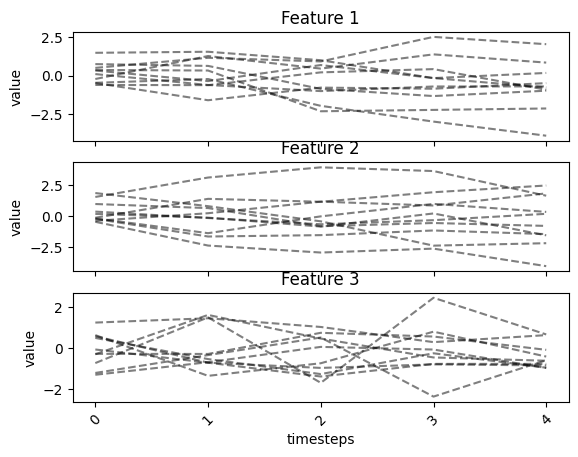
plot function is used to plot a time series plots of the different
features in a time series data
fig, ax = tsplot.plot(X=X_arr)
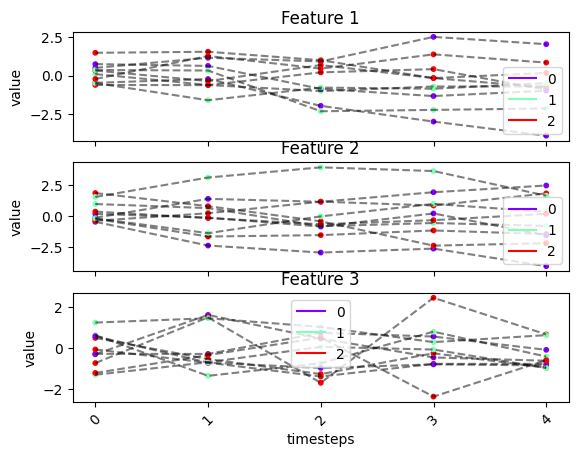
We can add label assignment to the plot
fig, ax = tsplot.plot(X=X_arr, labels=labels)
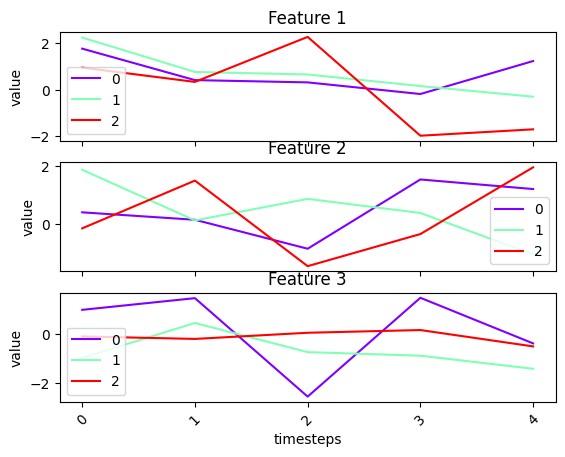
We can plot only cluster centers
fig, ax = tsplot.plot(cluster_centers=cluster_centers)
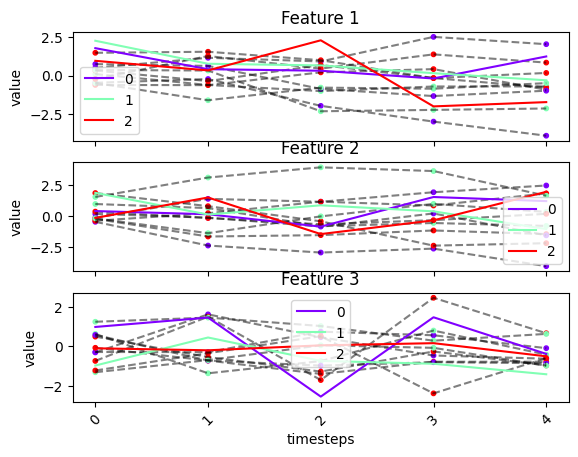
We can plot all of data X, cluster centers and label assignment in the same plot
fig, ax = tsplot.plot(X=X_arr, cluster_centers=cluster_centers, labels=labels)
# note that the cluster centers are not meaningfull since they were randomly generated
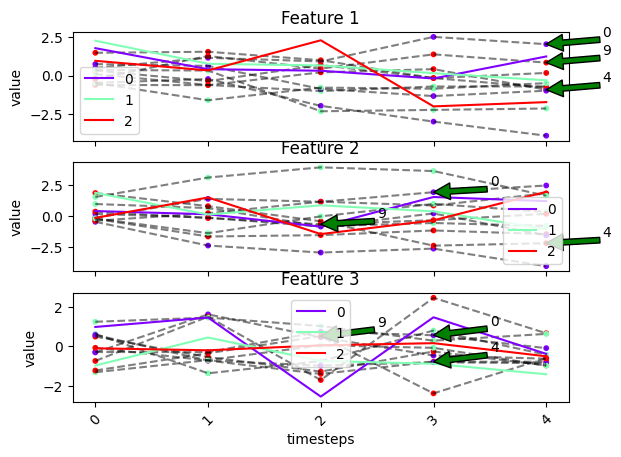
We can also annotate only specific entities by passing their index to
the entity_idx parameter
fig, ax = tsplot.plot(X=X_arr, cluster_centers=cluster_centers, labels=labels, entity_idx=[0, 4, 9])
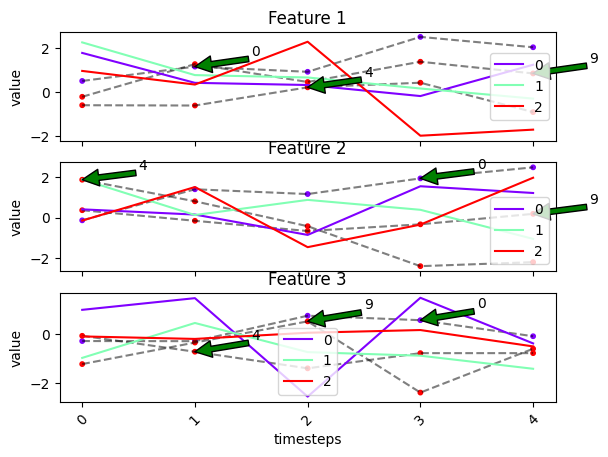
We can show only the entities in entity_idx by setting
show_all_entities to False
fig, ax = tsplot.plot(X=X_arr, cluster_centers=cluster_centers, labels=labels, entity_idx=[0, 4, 9], show_all_entities=False)
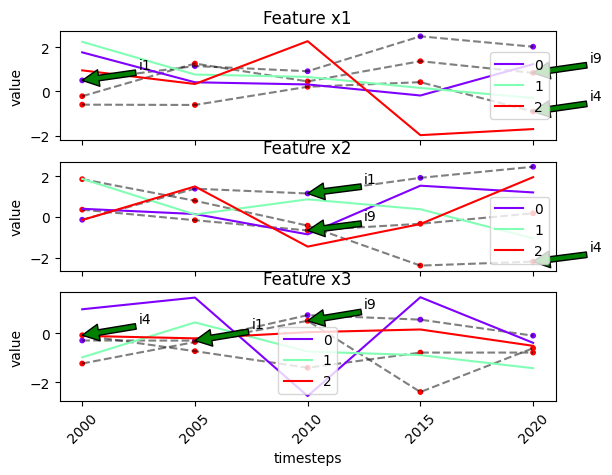
We can use the labels in label_dict to label the entities in
entity_idx by passing label_dict
# recall our label dict
label_dict
{'T': ['2000', '2005', '2010', '2015', '2020'],
 'N': ['i1', 'i10', 'i2', 'i3', 'i4', 'i5', 'i6', 'i7', 'i8', 'i9'],
 'F': ['x1', 'x2', 'x3']}
fig, ax = tsplot.plot(
    X=X_arr,
    cluster_centers=cluster_centers,
    labels=labels,
    entity_idx=[0, 4, 9],
    show_all_entities=False,
    label_dict=label_dict
)
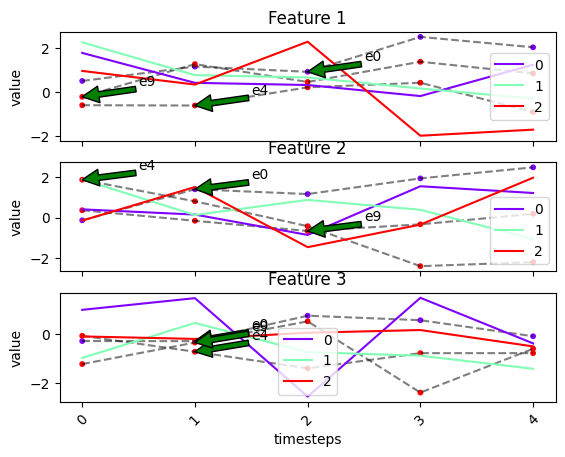
We can pass custom labels to the labels in entity_idx using the
entities_labels parameter.
fig, ax = tsplot.plot(
    X=X_arr,
    cluster_centers=cluster_centers,
    labels=labels,
    entity_idx=[0, 4, 9],
    entities_labels=['e0', 'e4', 'e9'],
    show_all_entities=False
)
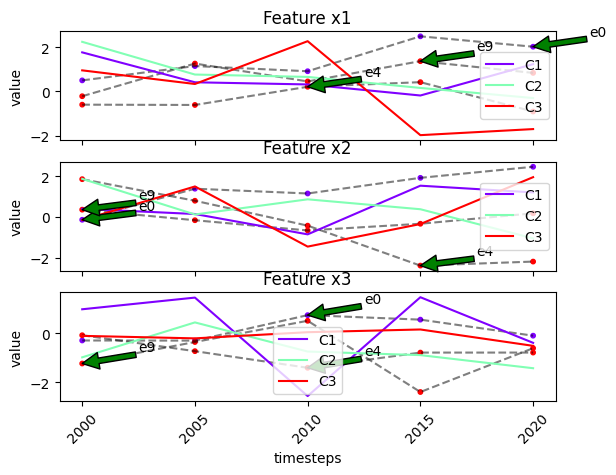
We can also pass custom labels for the cluster centers using the
cluster_labels parameter
fig, ax = tsplot.plot(
    X=X_arr,
    cluster_centers=cluster_centers,
    labels=labels,
    entity_idx=[0, 4, 9],
    entities_labels=['e0', 'e4', 'e9'],
    show_all_entities=False,
    label_dict=label_dict,
    cluster_labels=['C1', 'C2', 'C3']
)
waterfall_plot
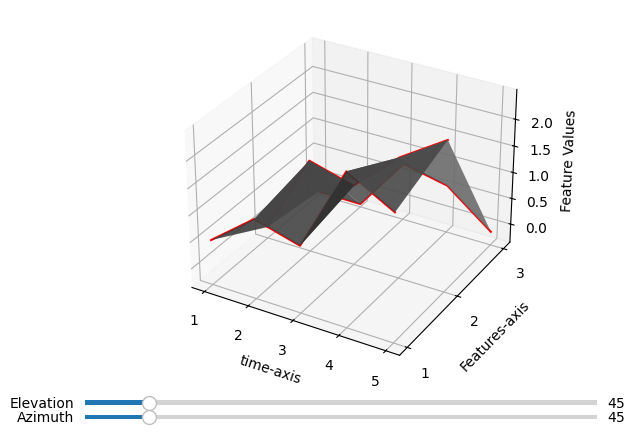
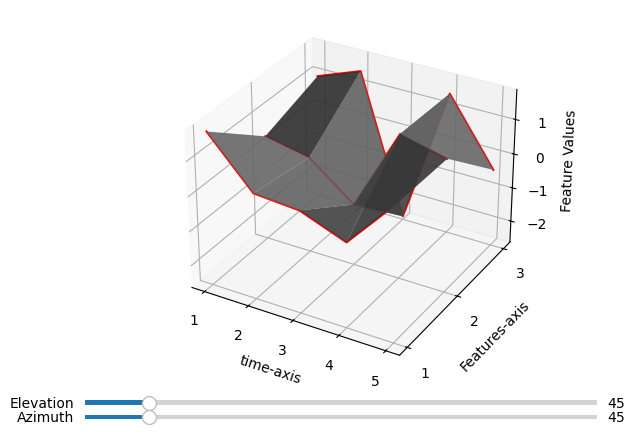
waterfall_plot can be used to generate a 3-D time series plot of a
particular entity or cluster center.
To make the plot interactive, use a suitable matplotlib’s magic command.
E.g. %matplotlib widget. See this site for more:
https://matplotlib.org/stable/users/explain/figure/interactive.html
# waterfall plot of a single entity
idx = 0
fig, ax = tsplot.waterfall_plot(X_arr[:, idx, :])
# waterfall plot of a single cluster center
idx = 0
fig, ax = tsplot.waterfall_plot(cluster_centers[:, idx, :])
Temporal Clustering Models
All temporal clustering modules implements a fit method (in which on
executing, compute the cluster centers and label assignments).
We can use the cluster_centers_ and labels_ attributes to
retreive the cluster centers and label assignments respectively. Here we
used sklearn’s convention of using trailing underscores for attributes
whose values are known only after fitting.
OptTSCluster
fixed centers, dynamic assignment
# initialize the model
opt_ts = OptTSCluster(
    n_clusters=3,
    scheme='z0c1', # fixed centers, dynamic assignment
    n_allow_assignment_change=None # number of changes to allow, None means allow as many changes as possible
    # warm_start=True # warm start with kmeans
)
model_size = opt_ts.get_model_size(X_arr)
print(f"model has {model_size[0]} variables and {model_size[1]} constraints")
Restricted license - for non-production use only - expires 2025-11-24
model has 610 variables and 950 constraints
label_dict
{'T': ['2000', '2005', '2010', '2015', '2020'],
 'N': ['i1', 'i10', 'i2', 'i3', 'i4', 'i5', 'i6', 'i7', 'i8', 'i9'],
 'F': ['x1', 'x2', 'x3']}
# fit the model
opt_ts.fit(X_arr, label_dict=label_dict); # we can optionally pass the label dict to the model during fit
Warm starting...
Done with warm start after 0.04secs

Obj val: [3.77787002]

Total time is 0.86secs
# checking the label dict
opt_ts.label_dict_
{'T': ['2000', '2005', '2010', '2015', '2020'],
 'N': ['i1', 'i10', 'i2', 'i3', 'i4', 'i5', 'i6', 'i7', 'i8', 'i9'],
 'F': ['x1', 'x2', 'x3']}
# retrieving the index of the some time labels
opt_ts.get_index_of_label(['2005', '2010'], axis='T')
[1, 2]
# retrieving the labels of the some entity indexes
opt_ts.get_label_of_index([1, 3, 0], axis='N')
['i10', 'i3', 'i1']
We can get the cluster centers as a dataframe with the labels in
label_dict
cluster_centers_lst = opt_ts.get_named_cluster_centers()
cluster_centers_lst[0] # first cluster
| x1 | x2 | x3 | |
|---|---|---|---|
| 2000 | -2.028199 | -2.377959 | -0.353205 |
| 2005 | -2.028199 | -2.377959 | -0.353205 |
| 2010 | -2.028199 | -2.377959 | -0.353205 |
| 2015 | -2.028199 | -2.377959 | -0.353205 |
| 2020 | -2.028199 | -2.377959 | -0.353205 |
We can also get the labels as a dataframe indexed with labels in
label_dict
opt_ts.get_named_labels()
| 2000 | 2005 | 2010 | 2015 | 2020 | |
|---|---|---|---|---|---|
| i1 | 2 | 2 | 1 | 1 | 1 |
| i10 | 2 | 2 | 0 | 2 | 0 |
| i2 | 2 | 0 | 0 | 0 | 0 |
| i3 | 2 | 2 | 2 | 1 | 2 |
| i4 | 2 | 1 | 2 | 2 | 2 |
| i5 | 1 | 2 | 0 | 1 | 2 |
| i6 | 2 | 2 | 2 | 2 | 2 |
| i7 | 2 | 0 | 2 | 1 | 1 |
| i8 | 2 | 1 | 1 | 1 | 2 |
| i9 | 2 | 2 | 2 | 2 | 1 |
Checking most dynamic entities
print(f"total number of cluster changes is: {opt_ts.n_changes_}")
opt_ts.get_dynamic_entities() # dynamic entities and their number of cluster changes
total number of cluster changes is: 19
(['i5', 'i7', 'i10', 'i8', 'i4', 'i3', 'i9', 'i2', 'i1'],
 [4, 3, 3, 2, 2, 2, 1, 1, 1])
# retrieve the cluster centers and labels
cc_opt_ts = opt_ts.cluster_centers_
labels_opt_ts = opt_ts.labels_
labels_opt_ts
array([[2, 2, 1, 1, 1],
       [2, 2, 0, 2, 0],
       [2, 0, 0, 0, 0],
       [2, 2, 2, 1, 2],
       [2, 1, 2, 2, 2],
       [1, 2, 0, 1, 2],
       [2, 2, 2, 2, 2],
       [2, 0, 2, 1, 1],
       [2, 1, 1, 1, 2],
       [2, 2, 2, 2, 1]])
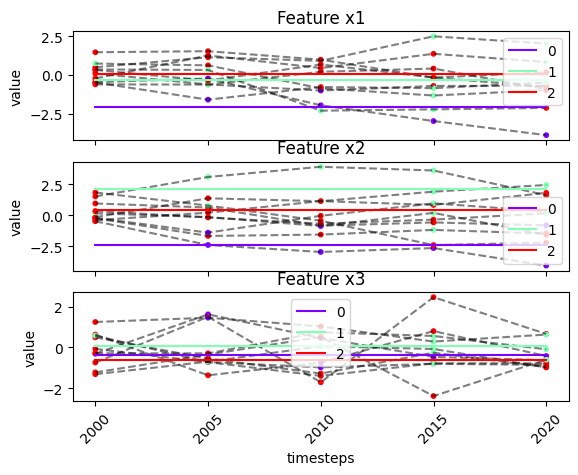
# plot model results
fig, ax = tsplot.plot(X=X_arr, cluster_centers=cc_opt_ts, labels=labels_opt_ts, label_dict=opt_ts.label_dict_)
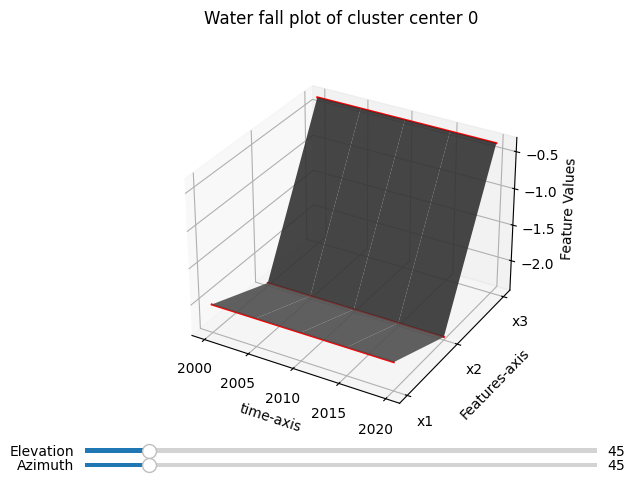
# waterfall plot of a particular cluster center
cc_idx = 0 # index of cluster center to plot
cc = broadcast_data(X_arr.shape[0], cluster_centers=cc_opt_ts)[0][:, cc_idx, :] # broadcasting the cluster center
fig, ax = tsplot.waterfall_plot(cc, label_dict=opt_ts.label_dict_)
fig.suptitle(f"Water fall plot of cluster center {cc_idx}");
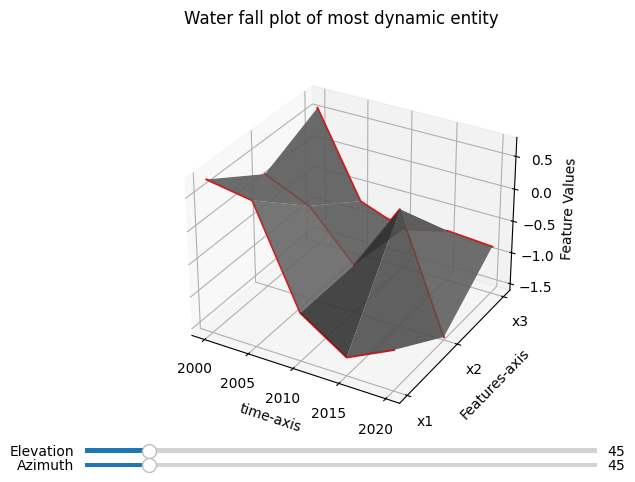
# waterfall plot of most dynamic entity
most_dynamic_entity_idx = np.where(opt_ts.get_named_labels().index == opt_ts.get_dynamic_entities()[0][0])[0][0]
fig, ax = tsplot.waterfall_plot(X_arr[:, most_dynamic_entity_idx, :], label_dict=opt_ts.label_dict_)
fig.suptitle("Water fall plot of most dynamic entity");
# scoring the model
print(f"inertia score is {inertia(X_arr, cc_opt_ts, labels_opt_ts, ord=1)}") # using l1 distance
print(f"max_dist score is {max_dist(X_arr, cc_opt_ts, labels_opt_ts, ord=1)}") # using l1 distance
inertia score is 138.84033246055895
max_dist score is 3.777870015440997
We can also set the label_dict after fitting
old_label_dict = opt_ts.label_dict_
old_label_dict
{'T': ['2000', '2005', '2010', '2015', '2020'],
 'N': ['i1', 'i10', 'i2', 'i3', 'i4', 'i5', 'i6', 'i7', 'i8', 'i9'],
 'F': ['x1', 'x2', 'x3']}
new_label_dict = {k: v for k, v in old_label_dict.items()}
new_label_dict['F'] = ['A', 'B', 'C']

opt_ts.set_label_dict(new_label_dict)
opt_ts.label_dict_
{'T': ['2000', '2005', '2010', '2015', '2020'],
 'N': ['i1', 'i10', 'i2', 'i3', 'i4', 'i5', 'i6', 'i7', 'i8', 'i9'],
 'F': ['A', 'B', 'C']}
dynamic centers, fixed assignment
# loading the data
X_arr2, _ = load_data("./sythetic_data.npy")
X_arr2.shape
(10, 15, 1)
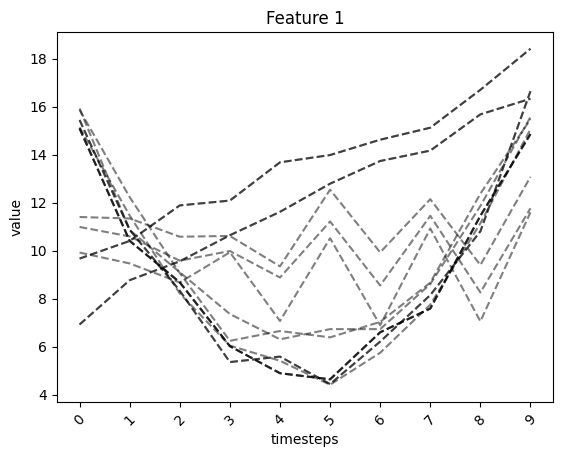
# visualizing the data
fig, ax = tsplot.plot(X=X_arr2)
# initialize the model
opt_ts = OptTSCluster(
    n_clusters=3,
    scheme='z1c1', # dynamic centers, dynamic assignment. Scheme needs to be a dynamic label scheme when using constrained cluster change
                   # you can also use 'z1c0' scheme here
    n_allow_assignment_change=0, # number of changes to allow, 0 means allow as no changes are allowed.
    warm_start=True # warm start with kmeans
)
# checking the size of the model
model_size = opt_ts.get_model_size(X_arr2)
print(f"model has {model_size[0]} variables and {model_size[1]} constraints")
model has 1066 variables and 1051 constraints
# fit the model
opt_ts.fit(X_arr2);
Warm starting...
Done with warm start after 0.08secs

Obj val: [1.51774178]

Total time is 0.19secs
print(f"total number of cluster changes is: {opt_ts.n_changes_}")
opt_ts.get_dynamic_entities() # indexes of dynamic entities and their number of cluster changes
total number of cluster changes is: 0
([], [])
# retrieve the cluster centers and labels
cc_opt_ts = opt_ts.cluster_centers_
labels_opt_ts = opt_ts.labels_
labels_opt_ts
array([[0, 0, 0, 0, 0, 0, 0, 0, 0, 0],
       [0, 0, 0, 0, 0, 0, 0, 0, 0, 0],
       [1, 1, 1, 1, 1, 1, 1, 1, 1, 1],
       [1, 1, 1, 1, 1, 1, 1, 1, 1, 1],
       [2, 2, 2, 2, 2, 2, 2, 2, 2, 2],
       [2, 2, 2, 2, 2, 2, 2, 2, 2, 2],
       [0, 0, 0, 0, 0, 0, 0, 0, 0, 0],
       [1, 1, 1, 1, 1, 1, 1, 1, 1, 1],
       [0, 0, 0, 0, 0, 0, 0, 0, 0, 0],
       [2, 2, 2, 2, 2, 2, 2, 2, 2, 2],
       [0, 0, 0, 0, 0, 0, 0, 0, 0, 0],
       [0, 0, 0, 0, 0, 0, 0, 0, 0, 0],
       [1, 1, 1, 1, 1, 1, 1, 1, 1, 1],
       [0, 0, 0, 0, 0, 0, 0, 0, 0, 0],
       [0, 0, 0, 0, 0, 0, 0, 0, 0, 0]])
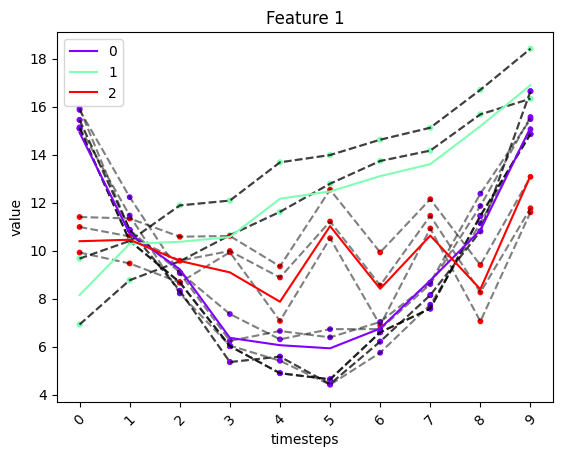
# plot of model results
fig, ax = tsplot.plot(X=X_arr2, cluster_centers=cc_opt_ts, labels=labels_opt_ts)
# scoring the model
print(f"inertia score is {inertia(X_arr2, cc_opt_ts, labels_opt_ts, ord=1)}") # using l1 distance
print(f"max_dist score is {max_dist(X_arr2, cc_opt_ts, labels_opt_ts, ord=1)}") # using l1 distance
inertia score is 117.50053747638934
max_dist score is 1.5177417770731711
Bounded Changes
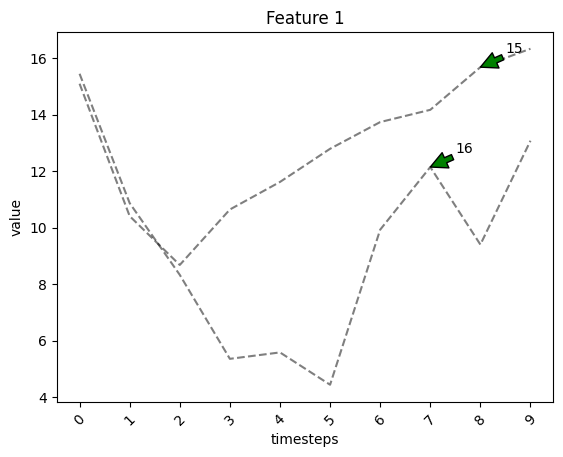
Creating dynamic entities
dynamic_X1 = np.concatenate([X_arr2[:3, 0, :], X_arr2[3:, 2, :]], axis=0)[:, np.newaxis, :]
dynamic_X2 = np.concatenate([X_arr2[:6, 6, :], X_arr2[6:, 4, :]], axis=0)[:, np.newaxis, :]
X_arr3 = np.concatenate([X_arr2, dynamic_X1, dynamic_X2], axis=1)
X_arr3.shape
(10, 17, 1)
# plotting the synthetically created dynamic entities
fig, ax = tsplot.plot(X=X_arr3, entity_idx=np.arange(X_arr2.shape[1], X_arr3.shape[1]), show_all_entities=False)
# initialize the model
opt_ts = OptTSCluster(
    n_clusters=3,
    scheme='z1c1', # dynamic centers, dynamic assignment. Scheme needs to be a dynamic label scheme when using constrained cluster change
    n_allow_assignment_change=2, # number of changes to allow, None means allow as many changes as possible
    warm_start=True # warm start with kmeans
)
# fit the model
opt_ts.fit(X_arr3);
Warm starting...
Done with warm start after 0.05secs

Obj val: [1.51774178]

Total time is 14.4secs
# checking model's size
opt_ts.get_model_size(X_arr3)
(1204, 1191)
print(f"total number of cluster changes is: {opt_ts.n_changes_}")
opt_ts.get_dynamic_entities() # indexes of dynamic entities and their number of cluster changes
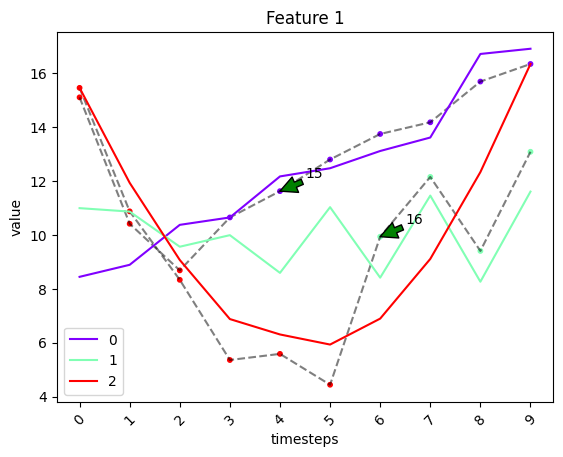
total number of cluster changes is: 2
([16, 15], [1, 1])
# retrieve the cluster centers and labels
cc_opt_ts = opt_ts.cluster_centers_
labels_opt_ts = opt_ts.labels_

# labels of dynamic entities
labels_opt_ts[opt_ts.get_dynamic_entities()[0]]
array([[2, 2, 2, 2, 2, 2, 1, 1, 1, 1],
       [2, 2, 2, 0, 0, 0, 0, 0, 0, 0]])
# plot of model results
fig, ax = tsplot.plot(
    X=X_arr3,
    cluster_centers=cc_opt_ts,
    labels=labels_opt_ts,
    entity_idx=opt_ts.get_dynamic_entities()[0],
    show_all_entities=False
)
# scoring the results
print(f"inertia score is {inertia(X_arr3, cc_opt_ts, labels_opt_ts, ord=1)}") # using l1 distance
print(f"max_dist score is {max_dist(X_arr3, cc_opt_ts, labels_opt_ts, ord=1)}") # using l1 distance
inertia score is 140.53425058177024
max_dist score is 1.5177417770731711
# checking the default label_dict (since we did not set the label dict or pass any during fit)
print(opt_ts.label_dict_)
{'T': [0, 1, 2, 3, 4, 5, 6, 7, 8, 9], 'N': [0, 1, 2, 3, 4, 5, 6, 7, 8, 9, 10, 11, 12, 13, 14, 15, 16], 'F': [0]}
TSGlobalKmeans
This module applies sklearn’s k-mean clustering to the data resulting from concatenating along the time axis.
# initialize the model
g_ts_km = TSGlobalKmeans(n_clusters=3)
# fit the model
g_ts_km.fit(X_arr3);
/usr/local/lib/python3.10/dist-packages/sklearn/cluster/_kmeans.py:870: FutureWarning: The default value of n_init will change from 10 to 'auto' in 1.4. Set the value of n_init explicitly to suppress the warning
  warnings.warn(
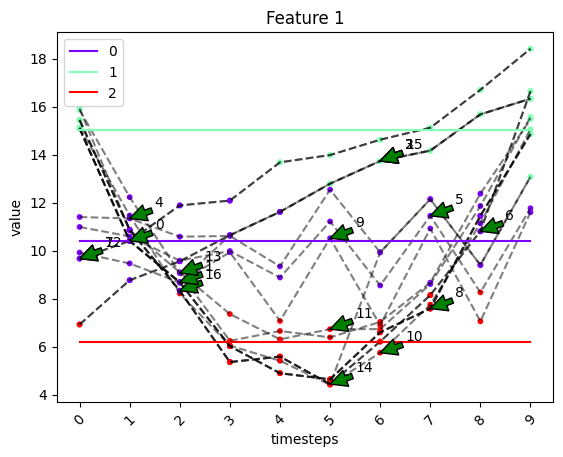
print(f"total number of cluster changes is: {g_ts_km.n_changes_}")
g_ts_km.get_dynamic_entities() # indexes of dynamic entities and their number of cluster changes
total number of cluster changes is: 53
([9, 16, 10, 1, 6, 8, 11, 13, 14, 0, 15, 5, 3, 2, 12, 7, 4],
 [6, 4, 4, 4, 4, 4, 4, 4, 4, 4, 2, 2, 2, 2, 1, 1, 1])
# retrieve the cluster centers and labels
cc_g_ts_km = g_ts_km.cluster_centers_
labels_g_ts_km = g_ts_km.labels_

# labels of dynamic entities
labels_g_ts_km[g_ts_km.get_dynamic_entities()[0]]
array([[0, 0, 0, 0, 2, 0, 2, 0, 2, 0],
       [1, 0, 0, 2, 2, 2, 0, 0, 0, 1],
       [1, 0, 2, 2, 2, 2, 2, 2, 0, 1],
       [1, 0, 0, 2, 2, 2, 2, 2, 0, 1],
       [1, 0, 0, 2, 2, 2, 2, 2, 0, 1],
       [1, 0, 0, 2, 2, 2, 2, 2, 0, 1],
       [1, 0, 0, 2, 2, 2, 2, 0, 0, 1],
       [1, 0, 0, 2, 2, 2, 2, 0, 0, 1],
       [1, 0, 0, 2, 2, 2, 2, 2, 0, 1],
       [1, 0, 0, 2, 2, 2, 2, 2, 0, 1],
       [1, 0, 0, 0, 0, 1, 1, 1, 1, 1],
       [0, 0, 0, 0, 0, 0, 0, 0, 2, 0],
       [2, 0, 0, 0, 0, 1, 1, 1, 1, 1],
       [2, 0, 0, 0, 0, 1, 1, 1, 1, 1],
       [0, 0, 0, 0, 1, 1, 1, 1, 1, 1],
       [0, 0, 0, 0, 1, 1, 1, 1, 1, 1],
       [0, 0, 0, 0, 0, 0, 0, 0, 0, 1]], dtype=int32)
# plot of model results
fig, ax = tsplot.plot(
    X=X_arr3,
    cluster_centers=cc_g_ts_km,
    labels=labels_g_ts_km,
    entity_idx=g_ts_km.get_dynamic_entities()[0],
    show_all_entities=False
)
# scoring the results
print(f"inertia score is {inertia(X_arr3, cc_g_ts_km, labels_g_ts_km, ord=1)}") # using l1 distance
print(f"max_dist score is {max_dist(X_arr3, cc_g_ts_km, labels_g_ts_km, ord=1)}") # using l1 distance
inertia score is 166.82397817096967
max_dist score is 3.3717592522248783
TSKmeans
This module applies tslearn’s time series k-mean clustering to the data.
# initialize the model
ts_km = TSKmeans(n_clusters=3)
# fit the model
ts_km.fit(X_arr3);
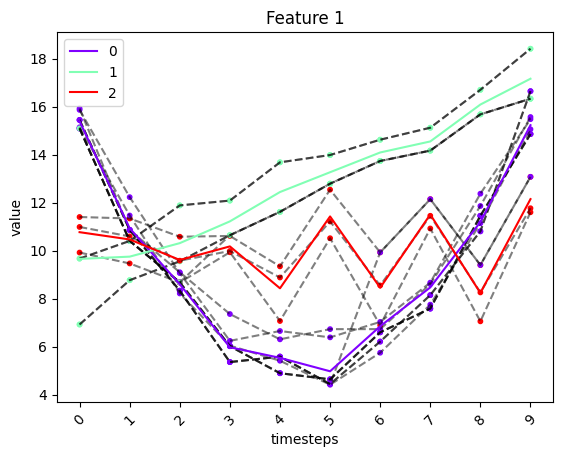
print(f"total number of cluster changes is: {ts_km.n_changes_}")
ts_km.get_dynamic_entities() # indexes of dynamic entities and their number of cluster changes
total number of cluster changes is: 0
([], [])
# retrieve the cluster centers and labels
cc_ts_km = ts_km.cluster_centers_
labels_ts_km = ts_km.labels_

# labels of dynamic entities
labels_ts_km[ts_km.get_dynamic_entities()[0]]
array([], dtype=int64)
# plot of model results
fig, ax = tsplot.plot(
    X=X_arr3,
    cluster_centers=cc_ts_km,
    labels=labels_ts_km
)
# scoring the results
print(f"inertia score is {inertia(X_arr3, cc_ts_km, labels_ts_km, ord=1)}") # using l1 distance
print(f"max_dist score is {max_dist(X_arr3, cc_ts_km, labels_ts_km, ord=1)}") # using l1 distance
inertia score is 113.52000410204052
max_dist score is 5.437567193350128